Vexleynira
Delta Archive
Delta Archive
Couldn't load pickup availability
Share
- 📄 Digital file available after purchase
- ♾️ Long-term availability
- 🔐 Secure checkout
- 🗓️ Content updated in 2026
Self-paced learning overview
1. Problem Statement
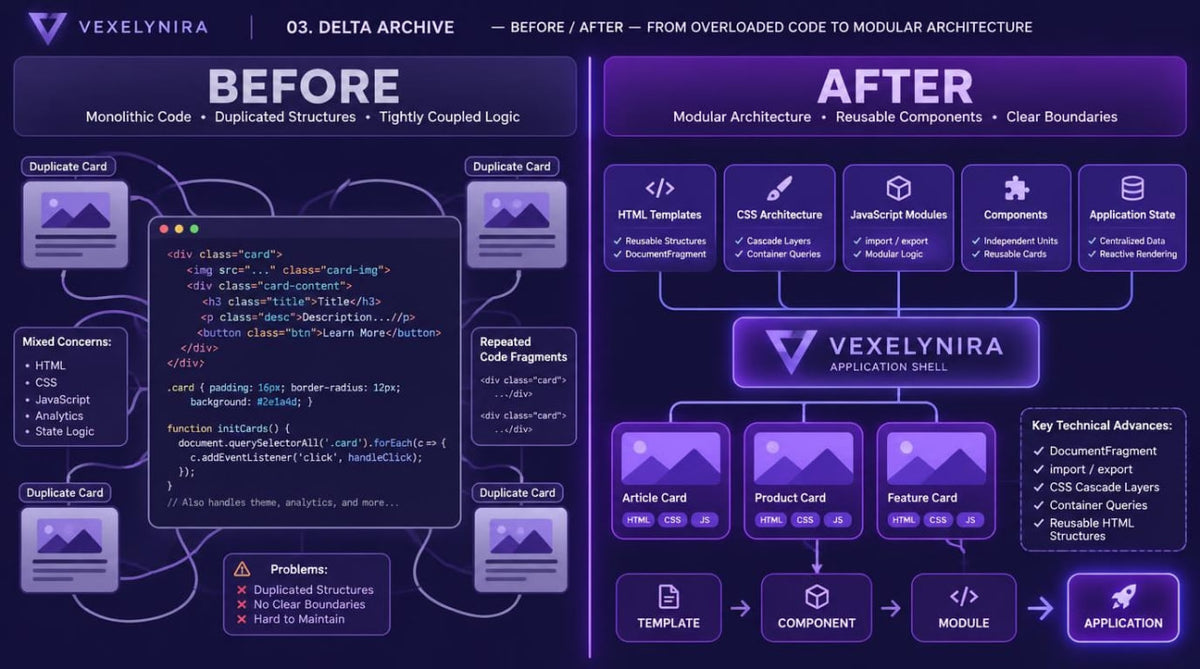
As web interfaces become more complex, the number of HTML elements, CSS rules, and JavaScript functions gradually increases, making the overall structure harder to maintain. Repeating identical code fragments across different pages creates difficulties when making changes and maintaining visual consistency. CSS files without clear responsibility boundaries may contain conflicting selectors, excessive specificity, and rules that are difficult to trace. JavaScript code also requires organization by functional areas, particularly when several components work with shared data and interface states.
2. Solution
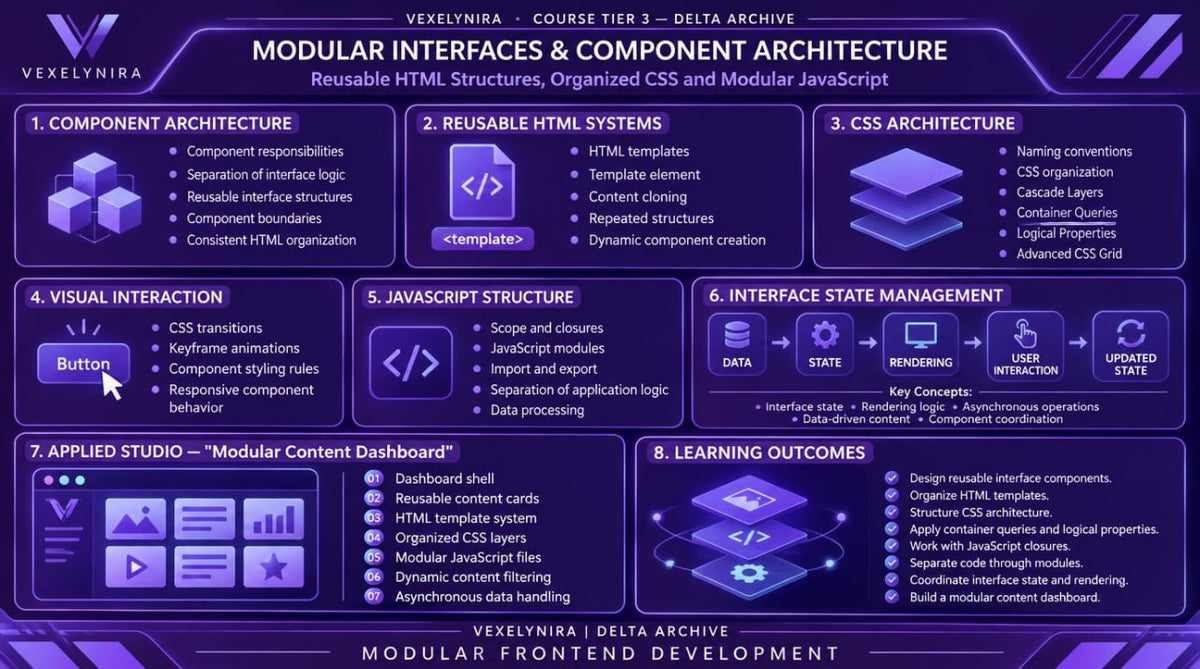
Delta Archive explores modular web project organization using HTML, CSS, and JavaScript. You will learn to create reusable templates, separate components according to their responsibilities, and develop a consistent styling system. Special attention is given to JavaScript modules, closures, interface state management, and asynchronous operations. In the final learning project, you will combine these concepts in a multi-component web interface featuring data filtering, dynamic content rendering, and an organized file structure.
3. What's Inside
Module 1: Component Architecture and Responsibilities
Explore the principles of dividing an interface into components, defining their responsibilities, and organizing interaction between individual page elements.
Module 2: Reusable HTML Structures
Learn to create reusable HTML templates for cards, navigation blocks, information sections, and other interface elements.
Module 3: HTML Template Elements and Cloning
Study the template element, document fragment cloning, and dynamic creation of repeated components.
Module 4: CSS Architecture and Naming Conventions
Explore CSS class organization methods, selector naming conventions, and principles for separating styles into functional areas.
Module 5: Cascade Layers and Style Organization
Learn to use @layer for organizing style layers, controlling the cascade, and reducing conflicts between CSS rules.
Module 6: CSS Container Queries
Explore container queries and learn to adapt components according to the dimensions of their parent containers.
Module 7: CSS Logical Properties
Study CSS logical properties and learn to create layouts that are independent of writing direction.
Module 8: Advanced Grid Composition
Explore nested grids, named areas, automatic element placement, and complex compositions using CSS Grid.
Module 9: CSS Transitions and Keyframe Animations
Learn to create transitions between visual states, use @keyframes, and configure animation properties for interface elements.
Module 10: JavaScript Scope and Closures
Study variable scope, lexical environments, and closures, including their use when creating independent component logic.
Module 11: JavaScript Modules and Code Separation
Learn to separate JavaScript code into individual files, use import and export, and define module responsibility boundaries.
Module 12: Interface State and Rendering Logic
Explore interface state models, DOM updates based on data, and component rendering according to state changes.
Module 13: Asynchronous JavaScript and Data Operations
Study Promise, async/await, error handling, and principles of asynchronous operations when retrieving and processing data.
Module 14: Applied Studio — Modular Content Dashboard
Create a multi-component web interface featuring reusable cards, categories, filters, dynamic content, and a separated JavaScript architecture.
4. Who Is This For?
A suitable choice if you:
✅ Already have foundational HTML, CSS, and JavaScript knowledge.
✅ Have created webpages and want to explore more complex interface structures.
✅ Want to organize code through individual components and modules.
✅ Want to study CSS architecture and cascade control.
✅ Are interested in closures, JavaScript modules, and asynchronous operations.
✅ Want to create interfaces with dynamic content and managed state.
This course may not suit you if you:
❌ Are not yet familiar with basic HTML document structure and CSS syntax.
❌ Have not studied JavaScript variables, functions, conditions, and DOM fundamentals.
❌ Are looking exclusively for introductory materials covering your first steps in web development.
❌ Expect in-depth coverage of server infrastructure, databases, or system administration.
5. What You'll Learn
After studying Delta Archive, you will be able to:
-
Design web interface structures divided into individual components.
-
Define component responsibilities and relationships with other elements.
-
Create reusable HTML templates.
-
Use template and DocumentFragment for dynamic element creation.
-
Organize CSS classes into functional groups.
-
Control CSS specificity and rule application order.
-
Use cascade layers through @layer.
-
Apply container queries to adapt individual components.
-
Build complex layouts with CSS Grid.
-
Create CSS transitions and keyframe animations.
-
Understand JavaScript lexical scope and closure mechanisms.
-
Separate code into independent modules using import and export.
-
Organize interface state and DOM updates.
-
Work with Promise and async/await.
-
Handle errors during asynchronous operations.
-
Create multi-component interfaces with dynamic data rendering.
-
Maintain a clear file structure and logical code separation.
6. Refund Information
Before placing an order, please review the official Vexleynira Refund Policy. The document describes refund terms, request submission procedures, and the rules for reviewing related inquiries.
How are the learning materials organized?
How are the learning materials organized?
Each course is divided into themed modules containing technical explanations, code examples, and practical exercises. This structure helps learners examine individual concepts and understand how they relate to one another.
Do I need previous knowledge to study the courses?
Do I need previous knowledge to study the courses?
Not necessarily. The collection includes learning materials for beginners as well as courses covering extended HTML, CSS, and JavaScript topics. The recommended study level is stated in each course description.