Vexleynira
Echo Blueprint
Echo Blueprint
Couldn't load pickup availability
Share
- 📄 Digital file available after purchase
- ♾️ Long-term availability
- 🔐 Secure checkout
- 🗓️ Content updated in 2026
Self-paced learning overview
1. Problem Statement
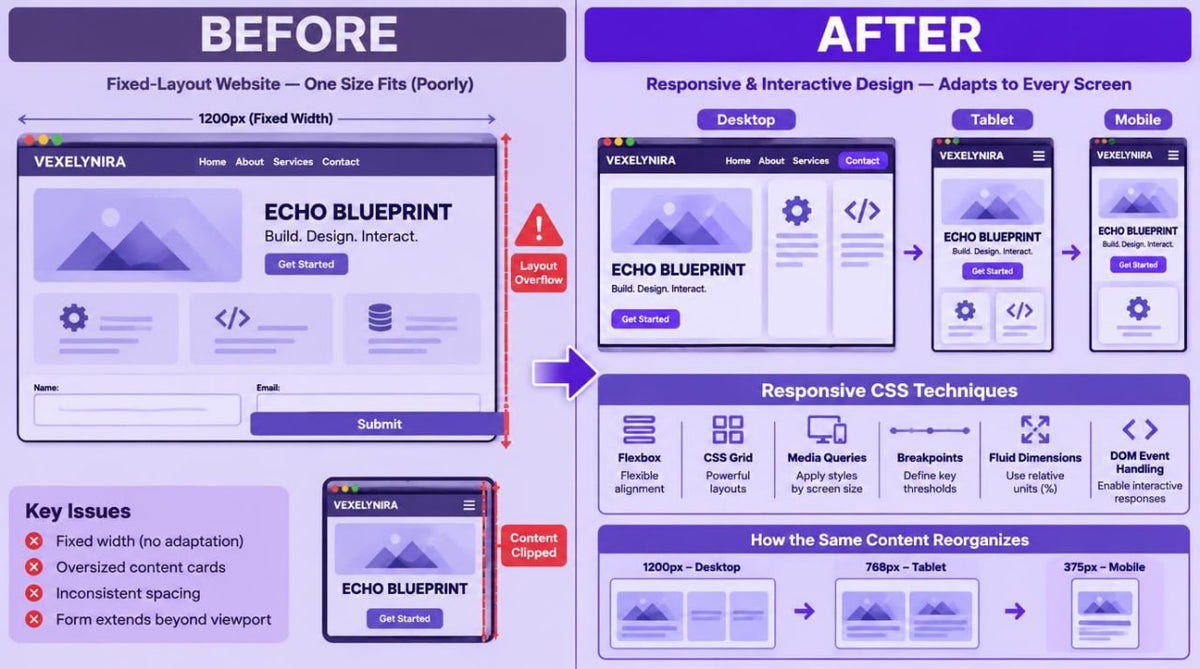
Moving from simple webpages to multi-section interfaces introduces new challenges related to content organization, layout composition, and element interaction. Standard CSS rules do not always provide consistent page styling, particularly when an interface contains different block types, forms, and navigation elements. Adapting layouts to different screen dimensions requires an understanding of flexible measurement units, breakpoints, and grid construction principles. In addition, interactive components require coordinated behavior between HTML structure, CSS states, and JavaScript events.
2. Solution
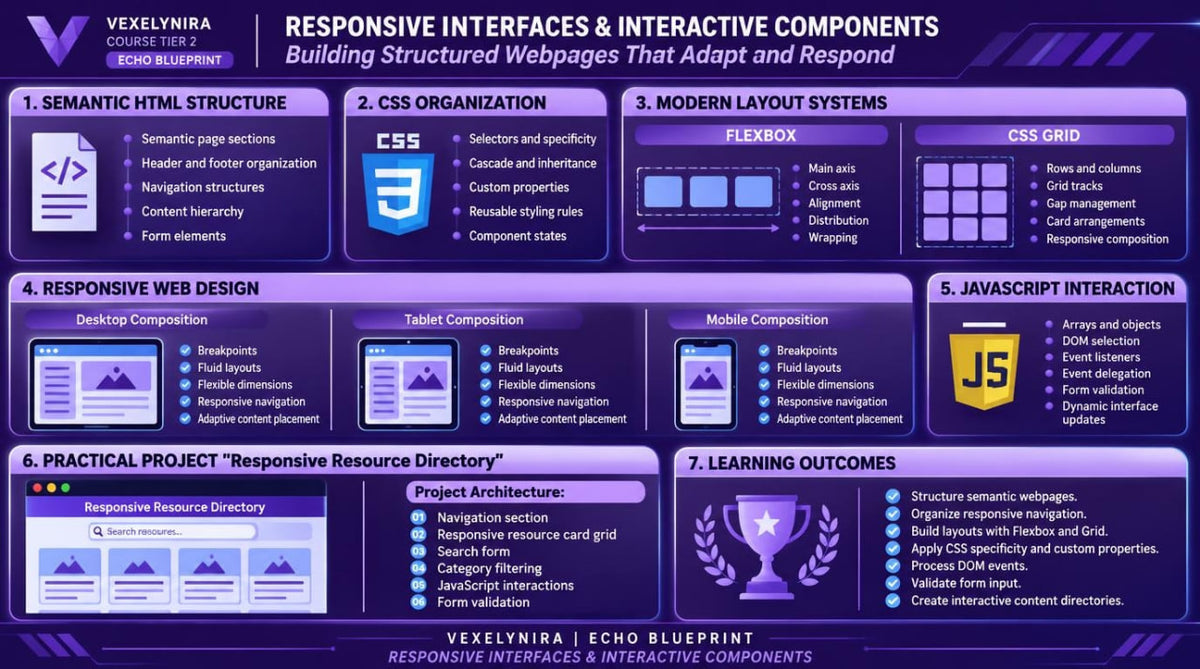
Echo Blueprint presents a structured study of responsive interface development using modern HTML, CSS, and JavaScript capabilities. You will explore multi-section page architecture, semantic forms, CSS custom properties, Flexbox, and Grid for organizing different layout types. Dedicated modules cover interactive states, arrays and objects, event delegation, and user input validation. The final practical assignment brings these topics together in a responsive web interface featuring navigation, cards, forms, and interactive elements.
3. What's Inside
Module 1: Semantic Page Architecture
Learn to organize multi-section webpages through semantic regions, heading hierarchy, and logical content divisions.
Module 2: Navigation Patterns and Page Sections
Explore multi-level navigation, internal links, navigation bars, and consistent page sections.
Module 3: Forms and Input Semantics
Learn to create structured HTML forms with different input types, labels, element groups, and input attributes.
Module 4: CSS Specificity, Inheritance and Cascade
Develop a deeper understanding of selector specificity, inheritance, and style application order in more complex CSS stylesheets.
Module 5: CSS Custom Properties and Design Tokens
Explore CSS variables and learn to create reusable values for colors, spacing, typography, and other visual properties.
Module 6: Flexbox Alignment Patterns
Learn to arrange navigation bars, card rows, and element groups through Flexbox direction, alignment, wrapping, and space distribution.
Module 7: CSS Grid and Two-Dimensional Layouts
Study two-dimensional grid construction, row and column configuration, minmax(), repeat(), and spacing between elements.
Module 8: Responsive Layout Strategies
Learn to combine flexible dimensions, breakpoints, media queries, and responsive typography for different screen formats.
Module 9: Interactive CSS States and Pseudo-elements
Explore hover, focus, active, and disabled states, along with pseudo-classes and pseudo-elements for styling interactive components.
Module 10: JavaScript Arrays and Objects
Learn to represent interface data through arrays and objects, iterate through collections, and retrieve individual property values.
Module 11: DOM Events and Event Delegation
Explore event propagation, delegated event handlers, and interaction organization across multiple webpage elements.
Module 12: Form Validation and User Feedback
Learn to validate entered values, work with field constraints, and display messages describing form completion states.
Module 13: Applied Studio — Responsive Resource Directory
Create a learning interface featuring navigation, a responsive card grid, a search form, and JavaScript-controlled interactive elements.
4. Who Is This For?
A suitable choice if you:
✅ Already know HTML, CSS, and JavaScript fundamentals and want to explore them in greater detail.
✅ Want to create multi-section webpages with clear structural organization.
✅ Want to expand your knowledge of Flexbox, CSS Grid, and responsive layouts.
✅ Are interested in creating forms and components with different interactive states.
✅ Want to organize JavaScript code for managing interface elements.
✅ Prefer practical study supported by examples and independent exercises.
This course may not suit you if you:
❌ Are not yet familiar with basic HTML, CSS, and JavaScript syntax.
❌ Are looking for in-depth server-side development and server application architecture.
❌ Expect detailed coverage of complex system integrations or specialized development tools.
5. What You'll Learn
After studying Echo Blueprint, you will be able to:
-
Organize multi-section HTML documents using semantic principles.
-
Create navigation structures and internal links between page sections.
-
Design HTML forms with different input types and attributes.
-
Analyze CSS selector specificity and style application order.
-
Use CSS Custom Properties for centralized styling management.
-
Build horizontal and vertical layouts with Flexbox.
-
Create two-dimensional layouts using CSS Grid.
-
Apply media queries and flexible dimensions for responsive styling.
-
Configure interactive element states through CSS.
-
Represent interface data through JavaScript arrays and objects.
-
Use DOM Events and Event Delegation.
-
Implement form data validation.
-
Organize interaction between HTML, CSS, and JavaScript within one interface.
-
Create responsive pages with reusable components.
6. Refund Information
Before placing an order, please review the Vexleynira Refund Policy. It outlines the applicable terms, request submission procedure, and rules for reviewing related inquiries.
How are the learning materials organized?
How are the learning materials organized?
Each course is divided into themed modules containing technical explanations, code examples, and practical exercises. This structure helps learners examine individual concepts and understand how they relate to one another.
Do I need previous knowledge to study the courses?
Do I need previous knowledge to study the courses?
Not necessarily. The collection includes learning materials for beginners as well as courses covering extended HTML, CSS, and JavaScript topics. The recommended study level is stated in each course description.