Vexleynira
Neon Pattern
Neon Pattern
Couldn't load pickup availability
Share
- 📄 Digital file available after purchase
- ♾️ Long-term availability
- 🔐 Secure checkout
- 🗓️ Content updated in 2026
Self-paced learning overview
1. Problem Statement
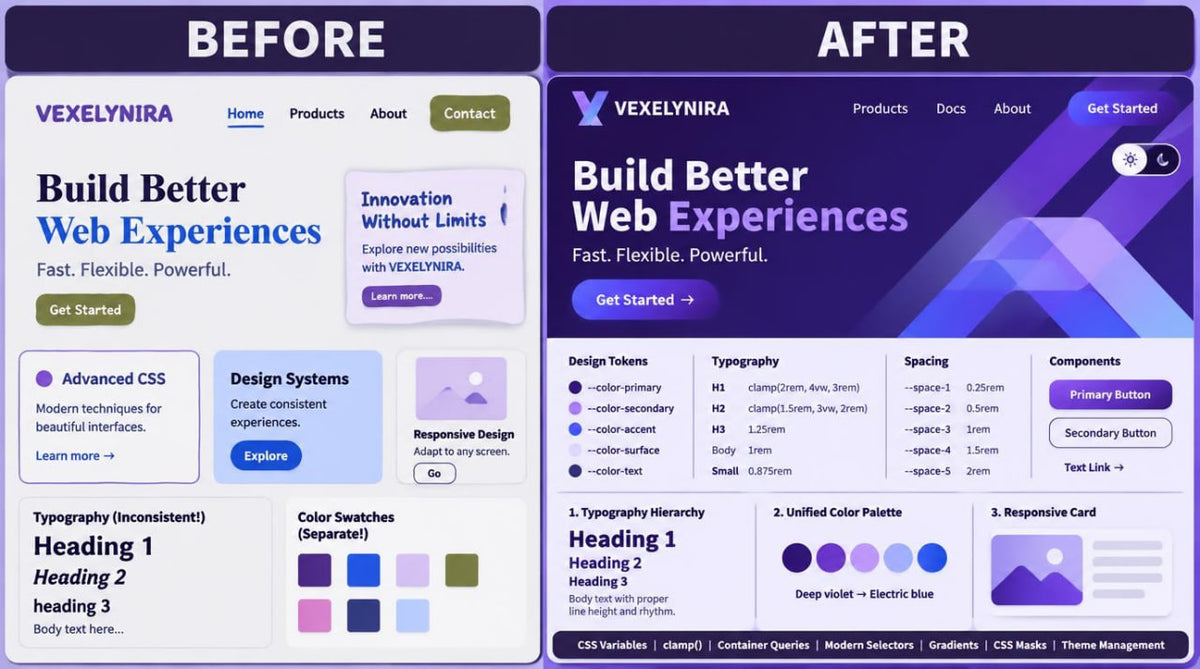
When creating large web interfaces, individual decisions about colors, typography, spacing, and visual effects can gradually lose consistency. Using different font values, spacing measurements, and color combinations across similar components makes it harder to maintain a unified page style. More complex visual compositions also require an understanding of modern CSS functions, image composition techniques, and visual layer management. Another challenge involves organizing interactive themes, preserving user preferences, and coordinating the behavior of different interface components.
2. Solution
Neon Pattern explores systematic visual styling through a combination of modern CSS and JavaScript capabilities. You will learn to develop color palettes, typographic scales, spacing rhythms, and styling rules for repeated components. Dedicated modules cover modern CSS selectors, nested rules, image composition, layered surfaces, and theme management. In the final learning project, you will create a multi-section web interface featuring an original visual system, responsive media, and interactive theme switching.
3. What's Inside
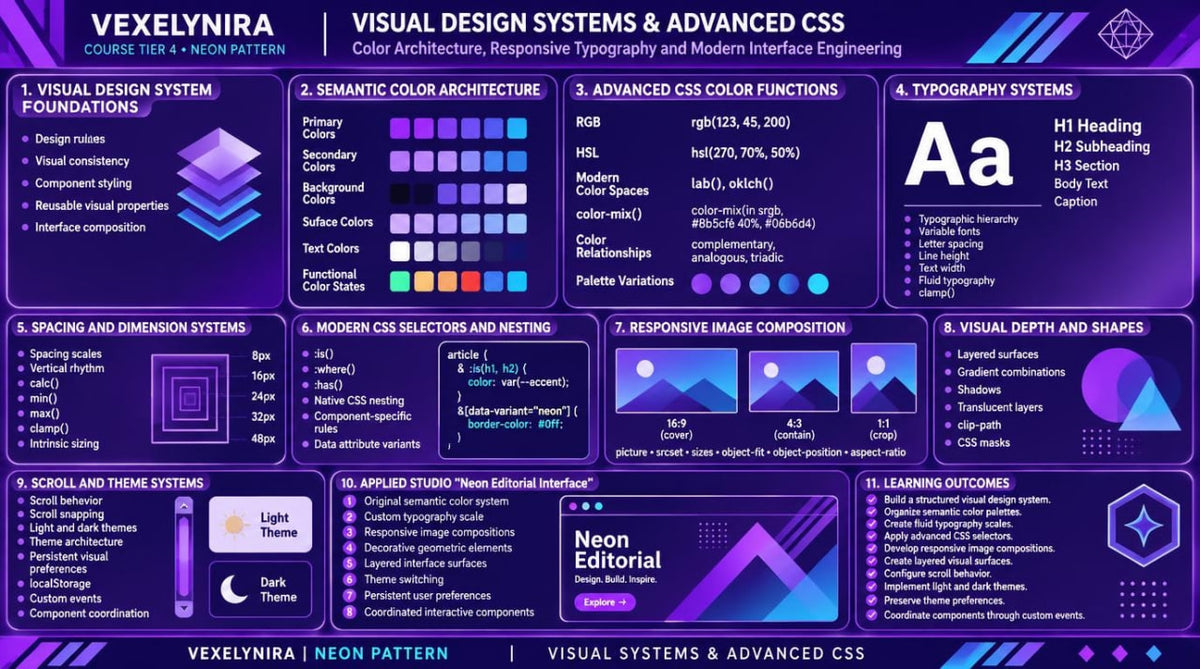
Module 1: Visual Design System Foundations
Explore the principles of building a visual system, defining styling rules, and maintaining consistent presentation across different webpage sections.
Module 2: Semantic Color Architecture
Learn to organize color palettes according to functional roles, create primary and supporting color groups, and define their usage rules.
Module 3: Advanced CSS Color Functions
Explore RGB, HSL, color spaces, and the color-mix() function, while learning to create derived color values for different component states.
Module 4: Advanced Typography Systems
Study typographic hierarchy, variable fonts, line spacing, text block width management, and principles for combining different font styles.
Module 5: Fluid Typography and Responsive Text
Learn to create flexible typographic scales using clamp(), configure heading sizes, and adapt text to different screen formats.
Module 6: Spacing Scales and Visual Rhythm
Explore spacing systems, vertical rhythm, element grouping, and methods for maintaining consistent distances between sections and components.
Module 7: Advanced CSS Math and Intrinsic Sizing
Learn to use calc(), min(), max(), and clamp() for flexible dimensions, container width constraints, and spacing management.
Module 8: Modern CSS Selectors — :is(), :where() and :has()
Explore advanced CSS selectors and learn to create complex styling conditions based on HTML element structure and state.
Module 9: Native CSS Nesting and Component Rules
Study nested CSS rules and learn to organize component styles through logical grouping of related selectors.
Module 10: Component Variants and Data Attributes
Learn to create component styling variants through HTML data-* attributes and corresponding CSS selectors.
Module 11: Responsive Image Art Direction
Explore the picture element, srcset and sizes attributes, and learn to define different image variations according to screen characteristics.
Module 12: Image Composition and Cropping Techniques
Learn to control image placement through object-fit, object-position, aspect-ratio, and other CSS properties.
Module 13: Layered Surfaces and Visual Depth
Explore layered backgrounds, gradients, shadows, translucent surfaces, and methods for creating visual separation between components.
Module 14: CSS Shapes, Clipping and Masks
Study clip-path, CSS masks, and complex geometric shapes for creating original decorative compositions in web interfaces.
Module 15: Scroll Behavior and Snap Patterns
Learn to configure scrolling behavior, section positioning, scroll-snap, and navigation element behavior while moving through a webpage.
Module 16: Theme Architecture and Visual Preferences
Explore light and dark color scheme organization, semantic CSS variables, and rules for applying different themes to components.
Module 17: JavaScript Theme Management and Persistent Settings
Learn to create theme switches, manage preferences through JavaScript, and preserve selected settings using localStorage.
Module 18: Custom Events and Component Coordination
Explore custom JavaScript events and organize interaction between components that respond to shared interface state changes.
Module 19: Applied Studio — Neon Editorial Interface
Create a multi-section editorial web interface featuring an original color system, typographic scale, responsive images, decorative compositions, and theme switching.
4. Who Is This For?
A suitable choice if you:
✅ Already have intermediate experience with HTML, CSS, and JavaScript.
✅ Want to create cohesive visual systems for webpages.
✅ Are interested in complex color palettes, typography, and interface composition.
✅ Want to expand your knowledge of modern CSS functions and selectors.
✅ Want to explore theme management through JavaScript.
✅ Work with multi-section pages and repeated components.
✅ Want to develop original visual styles with consistent styling rules.
This course may not suit you if you:
❌ Are not yet familiar with HTML, CSS, and JavaScript fundamentals.
❌ Are looking for an introductory course covering basic web development syntax.
❌ Do not plan to work with advanced CSS capabilities and interactive components.
❌ Expect server-side development, database, or server infrastructure training.
5. What You'll Learn
After studying Neon Pattern, you will be able to:
-
Develop visual systems with consistent styling rules.
-
Organize color palettes according to functional roles.
-
Use RGB, HSL, and modern CSS color-mixing functions.
-
Create typographic scales for different heading and text levels.
-
Work with variable fonts and text styling properties.
-
Use clamp() for responsive typography.
-
Build spacing systems and vertical rhythm.
-
Apply CSS functions such as calc(), min(), max(), and clamp().
-
Use modern selectors such as :is(), :where(), and :has().
-
Organize CSS through nested rules.
-
Create component variants using data attributes.
-
Manage image selection through picture, srcset, and sizes.
-
Configure image cropping and positioning.
-
Create layered backgrounds, gradients, and visual surfaces.
-
Use CSS clipping and masks for geometric compositions.
-
Configure scrolling behavior and scroll-snap.
-
Create separate color themes for web interfaces.
-
Implement theme switching through JavaScript.
-
Preserve user preferences using localStorage.
-
Organize component interaction through custom JavaScript events.
-
Combine visual systems, responsiveness, and interactivity in one learning project.
6. Refund Information
Before placing an order, please review the official Vexleynira Refund Policy. The document outlines refund terms, request submission procedures, and the rules for reviewing related inquiries.
How are the learning materials organized?
How are the learning materials organized?
Each course is divided into themed modules containing technical explanations, code examples, and practical exercises. This structure helps learners examine individual concepts and understand how they relate to one another.
Do I need previous knowledge to study the courses?
Do I need previous knowledge to study the courses?
Not necessarily. The collection includes learning materials for beginners as well as courses covering extended HTML, CSS, and JavaScript topics. The recommended study level is stated in each course description.